Codex-first development
Create and refine PLC software from your Codex workflow, reducing the need to constantly move between Codex and TIA Portal.
Controlled Codex–TIA Portal Bridge
VCJump makes Codex your engineering workspace for TIA Portal development.
Create and modify blocks, synchronize, compile, validate and save from your Codex workflow — with TIA Portal results returned directly to Codex.
No endless copy-paste. No constant switching between tools. Dramatically shorter development cycles.
WHAT IS VCJUMP?
VCJump is built to dramatically shorten the TIA Portal development cycle by connecting Codex to TIA Portal through a controlled, file-based engineering workflow.
Create and refine PLC software from your Codex workflow, reducing the need to constantly move between Codex and TIA Portal.
Using a local file-based VCI workspace and TIA Portal Openness, VCJump synchronizes approved PLC software changes into TIA Portal, initiates compilation in TIA Portal, validates the result, and saves the project only after successful checks. Results and updated project state can be returned to the VCI workspace for continued development in Codex.
Replace much of the manual copy-paste and constant tool switching with one connected engineering workflow, helping larger PLC projects move through development cycles substantially faster.
VCJump operates within defined project, workspace and approved PLC software boundaries, enabling AI-assisted development without giving Codex unrestricted access to the TIA Portal project.
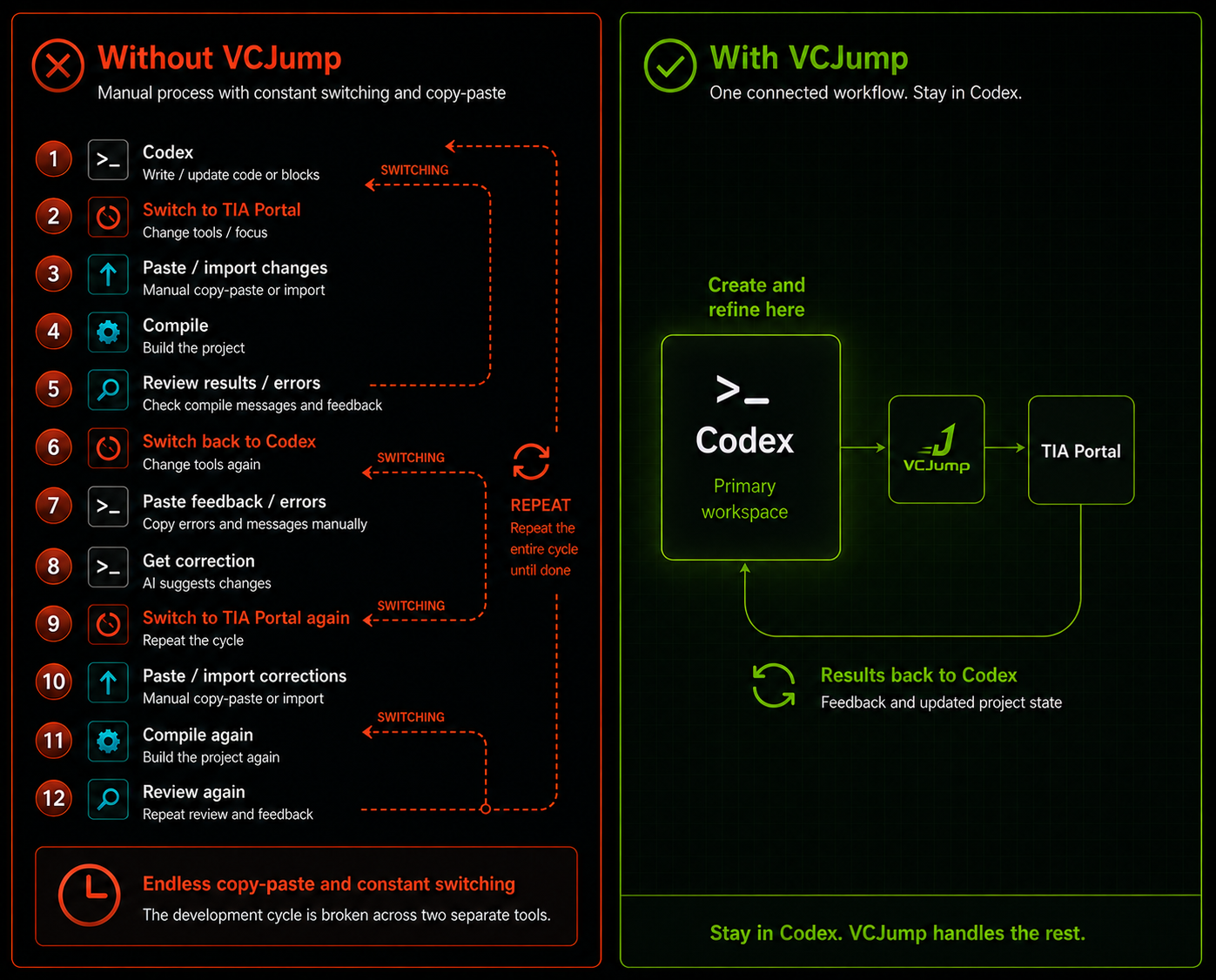
Workflow comparison
See the difference VCJump makes in your daily development process
Demos
Watch an AI agent create real PLC logic, work with Siemens TIA Portal, compile the project and receive the results back.
How it works
01 — Work in Codex
Create, modify and iterate PLC source artifacts from your Codex workflow inside the configured local VCI workspace.
02 — VCJump controls the bridge
VCJump validates the active TIA project, configured VCI workspace and approved PLC software before operations are allowed to proceed.
03 — Synchronize and validate
VCJump uses Siemens Openness to synchronize changes into TIA Portal, initiate compilation in TIA Portal, validate the result and save the project only after successful checks.
04 — Continue from the result
The resulting TIA state can be exported back into the VCI workspace so development can continue in Codex with the updated project state.
Features
Connects to Siemens TIA Portal V21 through Siemens Openness and operates only against configured projects, workspaces and explicitly approved PLC software objects.
Create and refine PLC software from your Codex workflow while VCJump manages synchronization, TIA Portal compilation and validation — reducing tool switching and dramatically shortening development iterations.
Move changes from the VCI workspace into TIA Portal and optionally export the resulting TIA state back into the workspace for continued work in Codex.
VCJump validates the active TIA project, VCI workspace and approved PLC software before operations continue, and stops the workflow when synchronization or compilation fails.
Controlled by design
VCJump is designed to give Codex a controlled engineering path into TIA Portal without providing unrestricted access to the project or automation system.
These safeguards are enforced by VCJump during runtime operations — they do not depend on the AI agent following prompt instructions.
Setup and tooling
Pricing
Request a free 14-day Trial license to evaluate the full VCJump workflow, then purchase a perpetual VCJump V21 license only if you decide to keep using it.
Request a Free 14-Day Trial
Request trial
$0
14 days
No payment required. Trial licenses are machine-bound and subject to eligibility and approval.
Setup guidance and diagnostics included
Launch offer
Regular price $249 Save $50
$199
One-time payment
System requirements
VCJump currently supports Siemens TIA Portal V21 only.
Download
No payment required. Trial licenses are machine-bound and subject to eligibility and approval.
Includes guided setup, diagnostics and documentation.
Current beta: VCJump v0.12.2-beta
Codex-first setup for TIA Portal V21
FAQ
VCJump is a controlled bridge between Codex and Siemens TIA Portal V21. It uses a local file-based VCI workspace and Siemens Openness to create a structured, bidirectional engineering workflow.
VCJump lets you initiate PLC software development actions from your Codex workflow, including synchronization, TIA Portal compilation, validation and saving, with results returned to Codex. This removes much of the manual copy-paste and constant switching between Codex and TIA Portal during development.
The current VCJump release is designed and validated for Siemens TIA Portal V21 only.
Yes. You can request a free 14-day Trial license. No payment is required. Trial licenses are machine-bound and subject to eligibility and approval.
The 14-day Trial license is intended for evaluation and includes setup guidance, diagnostics and documentation. Personal setup assistance is available to licensed users.
If you want to continue using VCJump, you can purchase a perpetual VCJump V21 license.
The current launch price is $199 USD as a one-time payment.
No. The paid VCJump V21 license is a one-time purchase with no recurring fees.
No. VCJump operates only against configured workspaces and explicitly approved PLC software objects. It validates the active TIA project and workspace before allowing operations to proceed.
No. VCJump does not download to PLCs and does not perform online PLC operations.
No. The current VCJump workflow does not modify TIA Portal hardware configuration, network configuration or device addresses.
Yes. Changes can be synchronized from the VCI workspace into TIA Portal, and the resulting TIA state can optionally be exported back into the workspace so Codex can continue working with the updated project state.
VCJump runs locally and connects to Siemens TIA Portal V21 through Siemens Openness.